Làm việc với file văn bản Word, Excel, PDF…trong học tập và văn phòng
- Thứ tư - 04/11/2026 14:24
- In ra
- Đóng cửa sổ này
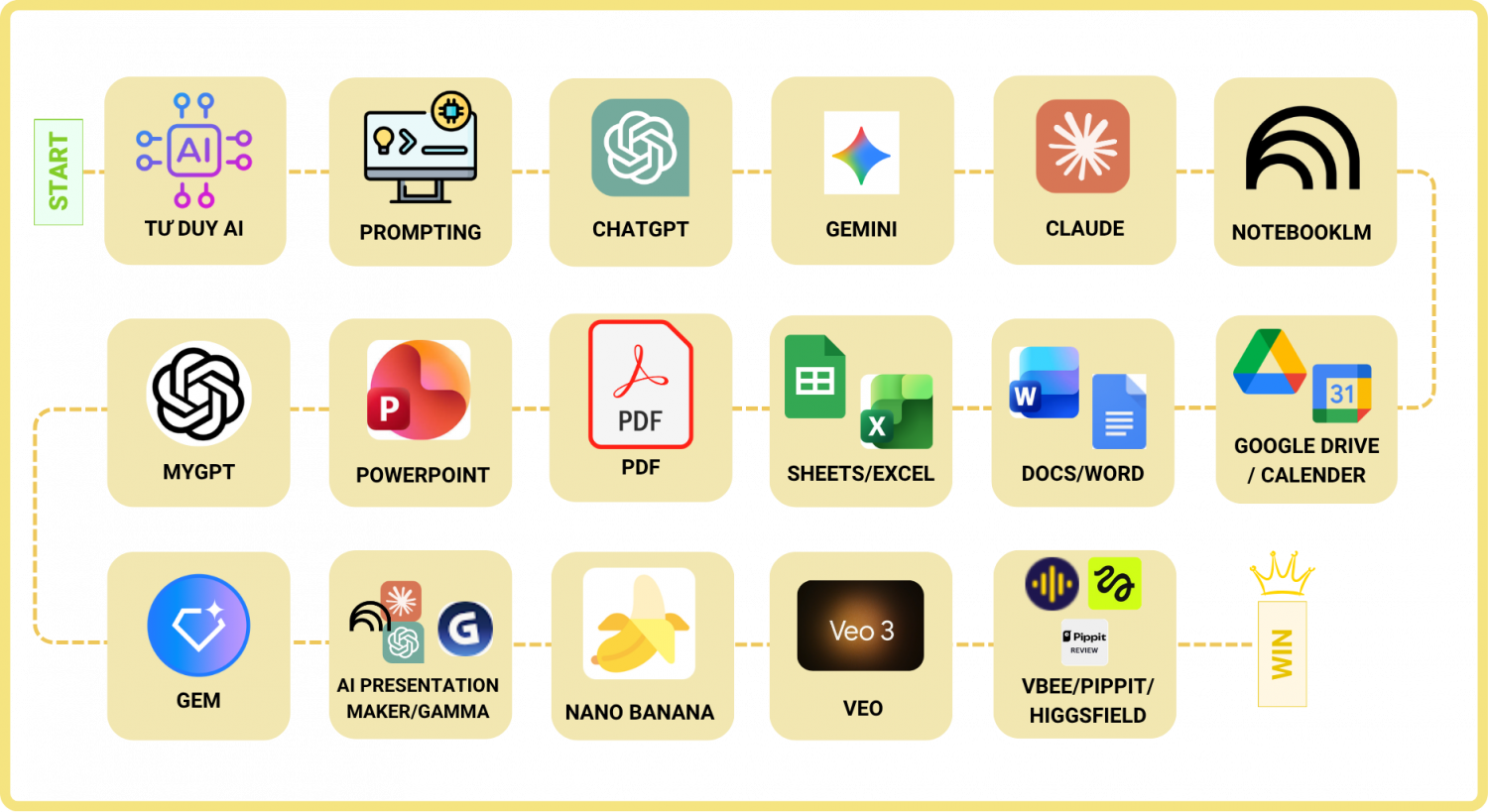
AI đang thay đổi cách bạn làm việc với tài liệu. Giờ đây, bạn có thể dùng AI để tạo, xem trước và chỉnh sửa trực tiếp các tệp Worrd, Excel, Powrpoint và PDF. Những việc từng mất hàng giờ nay chỉ mất vài phút, giúp bạn hoàn thành nhiều việc hơn và có ngay những tệp chỉn chu, sẵn sàng sử dụng.

Trí tuệ nhân tạo (AI) giúp tự động hóa và tăng tốc độ xử lý các tệp tin Word, Excel, PDF trong học tập và công việc văn phòng thông qua các công cụ tích hợp sẵn hoặc trợ lý AI chuyên biệt.
1. Ứng dụng AI với file Word (Soạn thảo & Biên tập)
2. Ứng dụng AI với file Excel (Xử lý dữ liệu & Bảng tính)
3. Ứng dụng AI với file PDF (Đọc hiểu, Tra cứu & Trích xuất)
4. Các công cụ AI tiêu biểu nên dùng
CÁCH THỰC HIỆN
MẸO NHANH ĐỂ CÓ KẾT QUẢ TỐT HƠN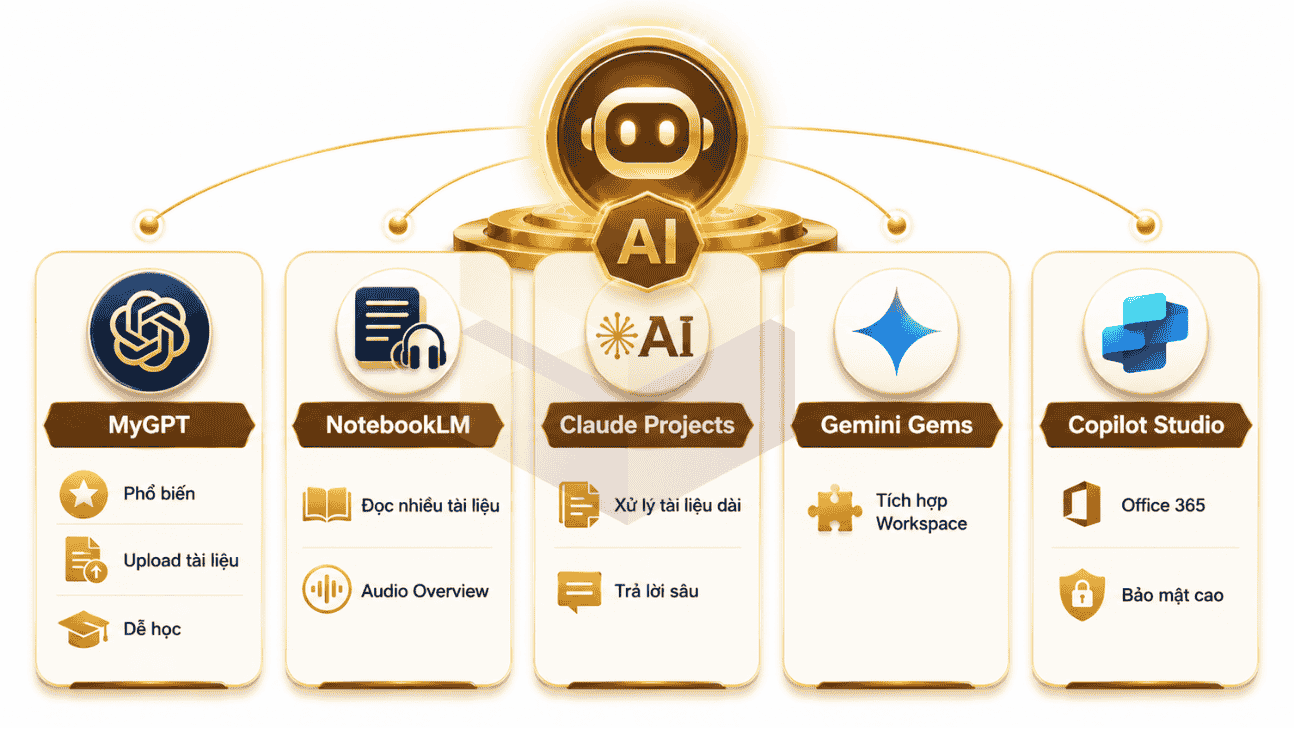
I - BIÊN TẬP TÀI LIỆU
1. BẢNG TÍNH VÀ DỮ LIỆU (SHEETS / EXCEL)
Biến dữ liệu lộn xộn thành bảng tính có tổ chức, bảng theo dõi tự động và mô hình dữ liệu hữu ích.
Prompt mẫu
Trích xuất thông tin từ những ảnh biên lai này và tạo một bảng tính rõ ràng với các cột ngày, mô tả khoản chi, số tiền và danh mục. Sắp xếp tất cả các khoản chi theo thứ tự thời gian, định dạng bảng tính chuyên nghiệp và tự động tính tổng chi phí.
2. TÀI LIỆU VÀ BÁO CÁO (DOCS / WORD)
Biến ghi chú thô, tài liệu nghiên cứu và các tệp đã tải lên thành tài liệu chuyên nghiệp, chỉn chu.
Prompt mẫu
Dựa trên các tài liệu đã tải lên, hãy soạn một báo cáo chuyên nghiệp, có bố cục rõ ràng về [CHỦ ĐỀ]. Báo cáo cần có phần mở đầu thu hút, các phát hiện chính, bằng chứng hỗ trợ, ví dụ thực tế và kết luận rõ ràng. Sắp xếp các đề mục hợp lý, diễn đạt súc tích và trình bày gọn gàng, chuyên nghiệp.
Prompt dành cho có nhiều tài liệu Word giúp đọc tài liệu, phân tích dữ liệu và tạo báo cáo nhanh hơn
3. BÀI THUYẾT TRÌNH (SLIDES / POWERPOINT)
Biến báo cáo dài, tài liệu nghiên cứu và ý tưởng sơ khai thành những bộ slide chỉn chu.
Prompt mẫu
Chuyển báo cáo nghiên cứu này thành một bài thuyết trình chuyên nghiệp về [CHỦ ĐỀ]. Sắp xếp các slide theo trình tự hợp lý, đặt tiêu đề thu hút, giải thích ngắn gọn, nêu bật những phát hiện quan trọng và đề xuất hình ảnh minh họa phù hợp. Giữ thiết kế nhất quán để mỗi slide đều rõ ràng, hấp dẫn và dễ theo dõi.
4. TỆP PDF VÀ TÀI LIỆU HỌC TẬP
Sắp xếp lại tài liệu học tập sẵn có thành những tài liệu dễ hiểu, dễ tra cứu.
Prompt mẫu
Chuyển những ghi chép bài giảng viết tay này thành một tài liệu học tập PDF đầy đủ, được trình bày chuyên nghiệp. Chia nội dung thành các phần hợp lý, giải thích rõ những khái niệm khó, làm nổi bật các định nghĩa quan trọng và bổ sung ví dụ thực tế cùng câu hỏi ôn tập. Dùng ghi chép đã tải lên làm nguồn chính và giữ đầy đủ thông tin quan trọng.
Nguyễn Thành Rainmaker
https://web.facebook.com/nguyenthanhrainmaker/posts/pfbid02X46L4cjRPeXEr4se4Kzieqi3urahGgtH8eCToxVdbk1dTpDD8VRZY3GeghtSsjQdl?locale=vi_VN
II- KIỂM DUYỆT TÀI LIỆU
1. SOI LỖI TOÀN BỘ
Prompt mẫu
"Hãy đóng vai người duyệt văn bản trước khi gửi chính thức và kiểm tra toàn bộ tài liệu tôi vừa tải lên: (1) Tìm lỗi chính tả, dấu câu, từ dùng sai, câu khó hiểu và những đoạn diễn đạt chưa rõ, (2) Đánh dấu từng lỗi theo đúng vị trí xuất hiện, (3) Đề xuất cách sửa ngay bên cạnh và giữ nguyên ý nghĩa ban đầu, (4) Nêu ra 5 lỗi quan trọng nhất cần sửa trước. Trình bày dạng bảng 3 cột: Vị trí | Lỗi | Gợi ý sửa."
Dùng khi: vừa soạn xong văn bản, cần rà nhanh trước khi đọc lại bằng mắt.
2. BẮT LỖI SỐ LIỆU
Prompt mẫu
"Hãy rà soát toàn bộ tài liệu theo các bước: (1) Kiểm tra mọi số liệu, ngày tháng, tỷ lệ, con số và thông tin định lượng, (2) Tìm những chỗ không thống nhất giữa các phần, ví dụ số ở phần mở đầu khác số trong bảng, hoặc tổng không khớp với các số thành phần, (3) Đối chiếu các bảng, nội dung và kết luận có liên quan với nhau, (4) Với mỗi điểm bất thường, nêu rõ vị trí, số liệu đang có và lý do cần kiểm tra lại. Chỉ dựa trên nội dung trong tài liệu, không tự ý sửa hay suy đoán số liệu khi chưa có căn cứ. Trình bày dạng bảng."
Dùng khi: làm báo cáo tuần/tháng/quý, báo cáo tài chính, thống kê có nhiều con số.
3. KIỂM TRA LOGIC
Prompt mẫu
"Hãy đọc tài liệu từ đầu đến cuối và kiểm tra tính logic: (1) Xem các ý có liên kết chặt chẽ với nhau không, (2) Tìm những chỗ mâu thuẫn, kết luận chưa khớp với số liệu hoặc lập luận còn thiếu bước, (3) Chỉ ra những nội dung bị lặp lại hoặc chuyển ý quá đột ngột, kèm giải thích ngắn gọn (1–2 câu) vì sao chưa hợp lý, (4) Đề xuất cách sắp xếp hoặc diễn đạt lại để tài liệu mạch lạc hơn. Trình bày rõ ràng theo từng vấn đề."
Dùng khi: viết đề án, kế hoạch, tờ trình, SKKN, những bài cần lập luận chặt.
4. BIÊN TẬP NHƯ SẾP DUYỆT
Prompt mẫu
"Hãy đóng vai lãnh đạo đang xem xét tài liệu này trước khi ký duyệt: (1) Tìm những câu quá dài, nội dung lan man, thông tin thừa và những chỗ người đọc dễ hiểu sai, (2) Kiểm tra xem mục tiêu, số liệu, kết luận và đề xuất đã rõ ràng chưa, (3) Đánh dấu những phần cần chỉnh sửa và nói rõ lý do, (4) Đưa ra phiên bản đề xuất ngắn gọn, chuyên nghiệp, dễ đọc hơn. Trình bày rõ ràng, tách phần nhận xét và phần đề xuất."
Dùng khi: sắp nộp văn bản cho cấp trên và muốn biết trước sếp sẽ góp ý gì.
5. DỌN SẠCH VĂN BẢN
Prompt mẫu
"Hãy làm gọn toàn bộ tài liệu nhưng không thay đổi nội dung cốt lõi: (1) Loại bỏ câu lặp, ý trùng, từ ngữ thừa và những đoạn diễn đạt rườm rà, (2) Thống nhất cách viết tên gọi, tiêu đề, ngày tháng và cách trình bày nếu đang mỗi chỗ một kiểu, (3) Giữ nguyên các số liệu và thông tin quan trọng, (4) Viết ra bản đã chỉnh sửa hoàn chỉnh để tôi có thể copy dùng ngay."
Dùng khi: văn bản do nhiều người cùng viết, mỗi phần một giọng, một kiểu trình bày.
6. KIỂM DUYỆT TRƯỚC KHI GỬI
Prompt mẫu
"Hãy kiểm tra lần cuối tài liệu này trước khi tôi gửi cho cấp trên hoặc khách hàng: (1) Lần lượt kiểm tra chính tả, câu chữ, số liệu, tính logic, sự nhất quán và cách trình bày, (2) Chia kết quả thành 3 nhóm: Lỗi bắt buộc phải sửa | Điểm nên cải thiện | Nội dung đã ổn, (3) Với mỗi lỗi, chỉ rõ vị trí và cách xử lý, (4) Kết luận: tài liệu đã sẵn sàng để gửi hay cần chỉnh sửa thêm."
Dùng khi: đã sửa xong và chuẩn bị bấm gửi, cần một lượt rà cuối cùng.
7. ĐỐI CHIẾU THỂ THỨC & QUY ĐỊNH
Prompt mẫu
"Hãy đối chiếu văn bản cần kiểm tra với quy định hoặc mẫu thể thức tôi đã tải lên: (1) Kiểm tra lần lượt quốc hiệu, tiêu ngữ, tên cơ quan ban hành, số và ký hiệu, ngày tháng, trích yếu, bố cục, căn cứ pháp lý, nơi nhận, phần ký, (2) So sánh hiện trạng trong văn bản với quy định yêu cầu, (3) Đề xuất cách sửa cho từng điểm chưa đúng, (4) Nếu quy định không có thông tin, ghi rõ “không có trong tài liệu” thay vì tự suy đoán. Trình bày dạng bảng: Nội dung kiểm tra | Hiện trạng | Quy định yêu cầu | Cách sửa."
Dùng khi: soạn công văn, tờ trình, thông báo, kết luận và cần đúng thể thức. Nhớ tải thêm file quy định hoặc văn bản mẫu lên cùng.
III - CHUYỂN ĐỔI TỆP TÀI LIỆU
Các tệp PDF của bạn có thể làm được nhiều điều hơn thế. Khám phá 8 cách mạnh mẽ để biến đổi chúng
1. Chuyển đổi tệp PDF thành bài thuyết trình PowerPoint chuyên nghiệp
Prompt mẫu
Hãy đọc kỹ tệp PDF đính kèm của tôi và chuyển đổi nó thành một bài thuyết trình PowerPoint chuyên nghiệp, chỉn chu gồm 12 trang, được thiết kế riêng cho [ĐỐI TƯỢNG MỤC TIÊU].
Cấu trúc bài thuyết trình bao gồm phần mở đầu hấp dẫn, các phần được sắp xếp logic, những thông tin cốt lõi và phần kết luận ấn tượng. Sử dụng cách diễn giải súc tích, các tiêu đề ý nghĩa, hình ảnh minh họa phù hợp cùng phong cách thiết kế chuyên nghiệp, đồng nhất.
Giữ lại tất cả các dữ kiện thiết yếu, chi tiết kỹ thuật và bối cảnh quan trọng. Tránh trình bày quá dày đặc trên mỗi trang hoặc bỏ sót các thông tin then chốt.
Tạo tệp PPTX hoàn chỉnh, có thể chỉnh sửa và tải xuống được — không chỉ dừng lại ở dạng dàn ý hay mô tả các trang trình bày.
2. Chuyển đổi dữ liệu trong tài liệu thành các biểu đồ và hình ảnh trực quan sâu sắc
Prompt mẫu
Phân tích dữ liệu số trong tài liệu đính kèm của tôi để xác định các mô hình, xu hướng, sự so sánh và những thông tin quan trọng nhất.
Lựa chọn các hình thức trực quan hóa phù hợp nhất, chẳng hạn như biểu đồ cột, biểu đồ đường, biểu đồ tròn hoặc các định dạng khác. Đảm bảo mỗi biểu đồ đều có nhãn, giá trị, đơn vị đo lường chính xác và nguồn dữ liệu rõ ràng.
Giải thích thông điệp chính từ mỗi hình ảnh trực quan, đồng thời làm nổi bật các mối liên hệ ý nghĩa hoặc những mô hình bất thường.
Chỉ sử dụng dữ liệu đã được xác thực từ tài liệu. Tuyệt đối không tự bịa đặt số liệu, tự suy đoán các giá trị còn thiếu hoặc đưa ra kết luận không có căn cứ.
Tạo các biểu đồ có thể tải xuống, đi kèm với những giải thích súc tích và sâu sắc.
3. Chuyển đổi tài liệu thành một infographic chuyên nghiệp
Prompt mẫu
Chuyển đổi tài liệu đính kèm của tôi thành một infographic chuyên nghiệp, có sức hút về mặt thị giác, truyền tải được 5–7 dữ kiện, phát hiện hoặc thông tin giá trị nhất.
Thiết lập hệ thống phân cấp thị giác rõ ràng với tiêu đề ấn tượng, nội dung hỗ trợ súc tích, các biểu tượng phù hợp, hình minh họa ý nghĩa và bố cục được sắp xếp khoa học.
Làm nổi bật các số liệu thống kê quan trọng một cách chính xác, đảm bảo giữ nguyên ý nghĩa gốc. Sử dụng màu sắc hài hòa, phông chữ dễ đọc cùng bố cục hiện đại, tinh gọn, tối ưu cho việc xem trên thiết bị di động và chia sẻ trên mạng xã hội.
Ưu tiên cách kể chuyện bằng hình ảnh thay vì các đoạn văn bản dài dòng.
Tạo ra tệp infographic hoàn chỉnh với chất lượng cao — không chỉ là mô tả bằng văn bản hay phác thảo thiết kế.
4. Chuyển đổi các quy trình trong tài liệu thành sơ đồ quy trình (flowchart) rõ ràng
Prompt mẫu
Xem xét tài liệu đính kèm của tôi và trích xuất các quy trình, thủ tục hoặc chuỗi ra quyết định được mô tả trong đó. Hãy chuyển đổi chúng thành một sơ đồ quy trình chuyên nghiệp, thể hiện rõ ràng từng bước, điểm quyết định, nhánh điều kiện, lộ trình thay thế và các kết quả có thể xảy ra.
Sử dụng các hình khối phù hợp, mũi tên chỉ hướng, nhãn chú thích súc tích cùng cấu trúc trực quan logic.
Giữ nguyên trình tự và ý nghĩa ban đầu. Phân biệt rõ ràng giữa các hành động, quyết định và kết quả cuối cùng.
Tạo ra một sơ đồ quy trình trực quan, dễ theo dõi và dễ hiểu — thay vì chỉ đưa ra lời giải thích bằng văn bản.
5. Chuyển đổi các sự kiện trong tài liệu thành dòng thời gian trực quan
Prompt mẫu
Phân tích tài liệu tôi đính kèm, xác định tất cả các ngày quan trọng, sự kiện lịch sử, cột mốc, thời hạn và các diễn biến theo trình tự thời gian.
Chuyển đổi thông tin đó thành một dòng thời gian trực quan chuyên nghiệp, sắp xếp các sự kiện theo đúng trình tự thời gian.
Bao gồm các mô tả súc tích, làm nổi bật rõ ràng các mốc thời gian, cùng các kết nối trực quan thể hiện mối liên hệ giữa các sự kiện.
Sử dụng bố cục gọn gàng, có cấu trúc tốt để người xem có thể nắm bắt dòng thời gian ngay từ cái nhìn đầu tiên.
Giữ nguyên thông tin gốc; tuyệt đối không tự ý thêm vào các ngày hoặc sự kiện không có trong tài liệu.
Tạo ra một dòng thời gian trực quan thực thụ — không chỉ đơn thuần là một danh sách liệt kê theo trình tự thời gian.
6. Chuyển đổi tài liệu PDF hoặc Word thành bảng tính Excel
Prompt mẫu
Trích xuất tất cả thông tin có cấu trúc từ tài liệu PDF hoặc Word tôi đính kèm, sau đó chuyển đổi thành một bảng tính Excel gọn gàng, có tổ chức và có thể chỉnh sửa hoàn toàn.
Xác định các danh mục dữ liệu hợp lý và đặt tiêu đề cột phù hợp. Sắp xếp các thông tin liên quan vào các trang tính (worksheet) riêng biệt nếu cần thiết.
Đảm bảo độ chính xác của các con số, ngày tháng, nhãn dữ liệu và mối quan hệ giữa các bản ghi. Áp dụng định dạng chuyên nghiệp, đảm bảo tính nhất quán của kiểu dữ liệu, thiết lập bộ lọc và cấu trúc sắp xếp hợp lý.
Nếu phát hiện thông tin bị thiếu, không nhất quán hoặc không rõ ràng, hãy đánh dấu lại thay vì tự đưa ra giả định.
Tạo tệp XLSX có thể tải xuống, sẵn sàng cho việc phân tích và chỉnh sửa thêm.
7. Chuyển đổi tài liệu thành tài liệu ôn tập và câu hỏi kiểm tra hoàn chỉnh
Prompt mẫu
Chuyển đổi tài liệu tôi đính kèm thành tài liệu ôn tập toàn diện, được sắp xếp khoa học dành cho học sinh/sinh viên ở [CẤP ĐỘ HỌC THUẬT].
Chia nội dung thành các chủ đề và chủ đề phụ một cách logic. Giải thích các khái niệm phức tạp bằng ngôn ngữ rõ ràng, dễ hiểu mà vẫn đảm bảo độ chính xác về mặt chuyên môn.
Làm nổi bật các định nghĩa cốt lõi, nguyên lý chính, công thức quan trọng, ví dụ và các khái niệm mà người học cần nắm vững.
Tiếp đó, soạn thảo 30 câu hỏi kiểm tra chất lượng cao bao quát các mục tiêu học tập chính của tài liệu, bao gồm các dạng câu hỏi trắc nghiệm, câu hỏi trả lời ngắn và câu hỏi vận dụng thực tế.
Cung cấp đáp án kèm theo giải thích rõ ràng cho từng câu hỏi.
Dựa hoàn toàn vào tài liệu được cung cấp để xây dựng nội dung ôn tập và câu hỏi; không đưa thêm thông tin không có trong tài liệu gốc.
8. Tạo sơ đồ tư duy trực quan và bảng so sánh chi tiết
Prompt mẫu
Phân tích tài liệu tôi đính kèm, sau đó chuyển đổi các thông tin chính thành một sơ đồ tư duy trực quan toàn diện và các bảng so sánh có cấu trúc. Trước tiên, hãy lập một sơ đồ tư duy bao gồm chủ đề trung tâm, các chủ đề chính, ý tưởng bổ trợ, các chủ đề phụ và mối quan hệ giữa các khái niệm.
Tiếp theo, xây dựng các bảng so sánh làm nổi bật rõ ràng những điểm tương đồng, khác biệt, ưu điểm, nhược điểm, thế mạnh và hạn chế của các khái niệm, phương pháp hoặc kết quả nghiên cứu được đề cập.
Sử dụng các mô tả súc tích, các danh mục có ý nghĩa và cấu trúc trực quan dễ theo dõi.
Đảm bảo sơ đồ tư duy và các bảng so sánh bổ trợ cho nhau mà không bị lặp lại thông tin không cần thiết.
Chỉ sử dụng thông tin có cơ sở từ tài liệu gốc, đồng thời tạo ra sơ đồ tư duy trực quan hoàn chỉnh đi kèm với các bảng so sánh.
1. Ứng dụng AI với file Word (Soạn thảo & Biên tập)
- Soạn thảo và chỉnh sửa văn bản: Dùng Microsoft Copilot (tích hợp trực tiếp trong Word) hoặc ChatGPT, Google Gemini để viết nhanh báo cáo, biên bản, hợp đồng, hoặc giáo án.
- Tóm tắt và dịch thuật: Đưa tài liệu Word dài vào các công cụ như Claude.ai hoặc ChatGPT để tóm tắt ý chính hoặc dịch sang nhiều ngôn ngữ khác nhau giữ nguyên cấu trúc.
- Kiểm tra ngữ pháp và văn phong: Sử dụng Grammarly để soát lỗi chính tả, cải thiện câu từ tiếng Anh hoặc tiếng Việt chuyên nghiệp hơn
2. Ứng dụng AI với file Excel (Xử lý dữ liệu & Bảng tính)
- Viết và sửa hàm, VBA: Thay vì phải nhớ cú pháp, bạn chỉ cần mô tả yêu cầu bằng tiếng Việt (ví dụ: "Tính tổng doanh thu theo quý cho các mặt hàng A") cho Microsoft Copilot hoặc các công cụ như Formularizer, ChatExcel, Ajelix để xuất ra công thức hoặc mã lệnh tự động.
- Dọn dẹp và phân tích dữ liệu: AI hỗ trợ chuẩn hóa bảng dữ liệu, loại bỏ giá trị trùng lặp, phân loại thông tin, lập báo cáo tài chính, bảng lương, và vẽ biểu đồ trực quan từ dữ liệu thô.
3. Ứng dụng AI với file PDF (Đọc hiểu, Tra cứu & Trích xuất)
- Hỏi đáp và trò chuyện với tài liệu (RAG):
- Sử dụng NotebookLM.google.com tải file PDF (sách, giáo trình, báo cáo nghiên cứu) lên để AI tóm tắt, trích dẫn đúng nguồn hoặc tạo podcast âm thanh tóm tắt nội dung.
- Dùng Perplexity.ai hoặc Claude.ai để phân tích các tài liệu pháp lý, hợp đồng hoặc bài báo khoa học dày hàng trăm trang.
- Chuyển đổi và trích xuất OCR: Nhận diện chữ viết từ file ảnh/PDF quét sang văn bản Word hoặc bảng Excel có thể chỉnh sửa được.
4. Các công cụ AI tiêu biểu nên dùng
- Đa năng & Tích hợp sâu: Microsoft Copilot, Google Gemini, ChatGPT.
- Chuyên đọc tài liệu dài & PDF: NotebookLM, Claude.ai.
- Hỗ trợ ghi chú & quản lý: Notion AI.
CÁCH THỰC HIỆN
- Bước 1. Mở công cụ AI
- Bước 2. Tải lên tài liệu nguồn, chẳng hạn như biên lai, ghi chép viết tay, tài liệu, tệp PDF hoặc dữ liệu thô.
- Bước 3. Mô tả chính xác nội dung bạn muốn công cụ AI tạo. Nêu rõ định dạng đầu ra, bố cục và những nội dung cần có.
- Bước 4. Xem trước tệp vừa tạo, chỉnh sửa hoặc bôi đen những phần cụ thể rồi yêu cầu công cụ cải thiện chúng.
- Bước 5. Mở tệp hoặc xuất tệp sang một định dạng được hỗ trợ.
MẸO NHANH ĐỂ CÓ KẾT QUẢ TỐT HƠN
- Luôn nêu rõ định dạng đầu ra mong muốn (PDF, tài liệu, bảng tính hoặc bản trình chiếu).
- Xác định bố cục, đối tượng hướng đến và mức độ chi tiết trước khi yêu cầu Gemini tạo tệp.
- Chọn đúng đoạn văn bản hoặc chi tiết hình ảnh cần chỉnh sửa.
- Đưa thêm chỉ dẫn để tinh chỉnh kết quả mà không cần làm lại từ đầu.
- Kiểm tra kỹ tệp đã hoàn thiện trước khi tải xuống hoặc chia sẻ.
I - BIÊN TẬP TÀI LIỆU
1. BẢNG TÍNH VÀ DỮ LIỆU (SHEETS / EXCEL)
Biến dữ liệu lộn xộn thành bảng tính có tổ chức, bảng theo dõi tự động và mô hình dữ liệu hữu ích.
- Trích xuất thông tin từ ảnh biên lai và đưa vào bảng tính có cấu trúc.
- Tạo bảng theo dõi chi tiêu, sắp xếp các tập dữ liệu và tạo công thức.
- Tạo bảng biểu và mô hình dữ liệu có cấu trúc từ những chỉ dẫn đơn giản.
- Xem trước kết quả trong Gemini và mở trực tiếp trong Google Sheets.
Prompt mẫu
Trích xuất thông tin từ những ảnh biên lai này và tạo một bảng tính rõ ràng với các cột ngày, mô tả khoản chi, số tiền và danh mục. Sắp xếp tất cả các khoản chi theo thứ tự thời gian, định dạng bảng tính chuyên nghiệp và tự động tính tổng chi phí.
2. TÀI LIỆU VÀ BÁO CÁO (DOCS / WORD)
Biến ghi chú thô, tài liệu nghiên cứu và các tệp đã tải lên thành tài liệu chuyên nghiệp, chỉn chu.
- Chuyển ghi chép bài giảng viết tay thành tài liệu học tập có hệ thống.
- Tạo báo cáo, bản đề xuất, bản tóm tắt và tài liệu nghiên cứu chuyên nghiệp.
- Xem trước tài liệu và chỉnh sửa nội dung trước khi hoàn thiện.
- Chọn những đoạn cụ thể và yêu cầu Gemini viết lại, bổ sung hoặc cải thiện nội dung.
Prompt mẫu
Dựa trên các tài liệu đã tải lên, hãy soạn một báo cáo chuyên nghiệp, có bố cục rõ ràng về [CHỦ ĐỀ]. Báo cáo cần có phần mở đầu thu hút, các phát hiện chính, bằng chứng hỗ trợ, ví dụ thực tế và kết luận rõ ràng. Sắp xếp các đề mục hợp lý, diễn đạt súc tích và trình bày gọn gàng, chuyên nghiệp.
Prompt dành cho có nhiều tài liệu Word giúp đọc tài liệu, phân tích dữ liệu và tạo báo cáo nhanh hơn
1. Tóm tắt tài liệu như chuyên gia
Prompt:
Hãy đọc toàn bộ file Word tôi tải lên và tóm tắt theo cấu trúc sau: mục tiêu của tài liệu, các ý chính theo từng phần, những kết luận quan trọng nhất, các số liệu đáng chú ý và những hành động cần thực hiện. Sau đó tạo thêm một phiên bản tóm tắt dài không quá 300 từ để tôi có thể đọc và nắm toàn bộ nội dung trong vòng 2 phút.
2. Phân tích chuyên sâu thay vì chỉ tóm tắt
Prompt:
Đừng chỉ tóm tắt nội dung. Hãy phân tích tài liệu như một chuyên gia trong lĩnh vực này. Chỉ ra các luận điểm mạnh, những điểm còn thiếu, các giả định chưa được chứng minh, rủi ro tiềm ẩn và những cơ hội có thể khai thác. Cuối cùng, đề xuất các giải pháp hoặc hướng cải thiện dựa trên nội dung của tài liệu.
3. Biến tài liệu thành báo cáo chuyên nghiệp
Prompt:
Hãy chuyển toàn bộ nội dung file Word thành một báo cáo chuyên nghiệp dành cho ban lãnh đạo. Báo cáo cần có phần tóm tắt điều hành, phân tích hiện trạng, các phát hiện quan trọng, biểu đồ hoặc bảng minh họa nếu cần, các đề xuất hành động ưu tiên và kết luận cuối cùng. Trình bày rõ ràng, logic và dễ đọc như một báo cáo tư vấn.
4. Trích xuất toàn bộ dữ liệu quan trọng
Prompt:
Hãy đọc tài liệu và tự động trích xuất toàn bộ dữ liệu quan trọng gồm số liệu, tên người, tổ chức, ngày tháng, địa điểm, KPI, chi phí, doanh thu, tỷ lệ phần trăm và các thông tin định lượng khác. Sau đó trình bày dưới dạng bảng để tôi có thể sao chép trực tiếp sang Excel hoặc Google Sheets.
5. So sánh nhiều tài liệu cùng lúc
Prompt:
Tôi sẽ tải lên nhiều file Word. Hãy đọc toàn bộ và so sánh chúng theo các tiêu chí gồm mục tiêu, nội dung chính, điểm giống nhau, điểm khác nhau, ưu điểm, hạn chế và kết luận. Sau đó cho biết tài liệu nào đầy đủ nhất, đáng tin cậy nhất và đề xuất phương án tối ưu nếu cần kết hợp các tài liệu này thành một báo cáo duy nhất.
6. Biến tài liệu thành kế hoạch hành động
Prompt:
Sau khi đọc toàn bộ file Word, hãy xây dựng cho tôi một kế hoạch triển khai thực tế. Chia thành từng giai đoạn với mục tiêu rõ ràng, danh sách công việc cần làm, người phụ trách nếu có, thời gian dự kiến hoàn thành, mức độ ưu tiên và các KPI để đo lường kết quả. Mục tiêu là giúp tôi có thể bắt tay vào thực hiện ngay mà không cần đọc lại tài liệu gốc.
Prompt:
Hãy đọc toàn bộ file Word tôi tải lên và tóm tắt theo cấu trúc sau: mục tiêu của tài liệu, các ý chính theo từng phần, những kết luận quan trọng nhất, các số liệu đáng chú ý và những hành động cần thực hiện. Sau đó tạo thêm một phiên bản tóm tắt dài không quá 300 từ để tôi có thể đọc và nắm toàn bộ nội dung trong vòng 2 phút.
2. Phân tích chuyên sâu thay vì chỉ tóm tắt
Prompt:
Đừng chỉ tóm tắt nội dung. Hãy phân tích tài liệu như một chuyên gia trong lĩnh vực này. Chỉ ra các luận điểm mạnh, những điểm còn thiếu, các giả định chưa được chứng minh, rủi ro tiềm ẩn và những cơ hội có thể khai thác. Cuối cùng, đề xuất các giải pháp hoặc hướng cải thiện dựa trên nội dung của tài liệu.
3. Biến tài liệu thành báo cáo chuyên nghiệp
Prompt:
Hãy chuyển toàn bộ nội dung file Word thành một báo cáo chuyên nghiệp dành cho ban lãnh đạo. Báo cáo cần có phần tóm tắt điều hành, phân tích hiện trạng, các phát hiện quan trọng, biểu đồ hoặc bảng minh họa nếu cần, các đề xuất hành động ưu tiên và kết luận cuối cùng. Trình bày rõ ràng, logic và dễ đọc như một báo cáo tư vấn.
4. Trích xuất toàn bộ dữ liệu quan trọng
Prompt:
Hãy đọc tài liệu và tự động trích xuất toàn bộ dữ liệu quan trọng gồm số liệu, tên người, tổ chức, ngày tháng, địa điểm, KPI, chi phí, doanh thu, tỷ lệ phần trăm và các thông tin định lượng khác. Sau đó trình bày dưới dạng bảng để tôi có thể sao chép trực tiếp sang Excel hoặc Google Sheets.
5. So sánh nhiều tài liệu cùng lúc
Prompt:
Tôi sẽ tải lên nhiều file Word. Hãy đọc toàn bộ và so sánh chúng theo các tiêu chí gồm mục tiêu, nội dung chính, điểm giống nhau, điểm khác nhau, ưu điểm, hạn chế và kết luận. Sau đó cho biết tài liệu nào đầy đủ nhất, đáng tin cậy nhất và đề xuất phương án tối ưu nếu cần kết hợp các tài liệu này thành một báo cáo duy nhất.
6. Biến tài liệu thành kế hoạch hành động
Prompt:
Sau khi đọc toàn bộ file Word, hãy xây dựng cho tôi một kế hoạch triển khai thực tế. Chia thành từng giai đoạn với mục tiêu rõ ràng, danh sách công việc cần làm, người phụ trách nếu có, thời gian dự kiến hoàn thành, mức độ ưu tiên và các KPI để đo lường kết quả. Mục tiêu là giúp tôi có thể bắt tay vào thực hiện ngay mà không cần đọc lại tài liệu gốc.
3. BÀI THUYẾT TRÌNH (SLIDES / POWERPOINT)
Biến báo cáo dài, tài liệu nghiên cứu và ý tưởng sơ khai thành những bộ slide chỉn chu.
- Chuyển báo cáo dài thành bài thuyết trình có bố cục rõ ràng.
- Soạn nội dung cho từng slide và sắp xếp thông tin quan trọng theo trình tự hợp lý.
- Xem trước bài thuyết trình trước khi chỉnh sửa lần cuối.
- Chọn những phần cụ thể và yêu cầu Gemini cải thiện cách diễn đạt, bố cục hoặc cách trình bày hình ảnh.
Prompt mẫu
Chuyển báo cáo nghiên cứu này thành một bài thuyết trình chuyên nghiệp về [CHỦ ĐỀ]. Sắp xếp các slide theo trình tự hợp lý, đặt tiêu đề thu hút, giải thích ngắn gọn, nêu bật những phát hiện quan trọng và đề xuất hình ảnh minh họa phù hợp. Giữ thiết kế nhất quán để mỗi slide đều rõ ràng, hấp dẫn và dễ theo dõi.
4. TỆP PDF VÀ TÀI LIỆU HỌC TẬP
Sắp xếp lại tài liệu học tập sẵn có thành những tài liệu dễ hiểu, dễ tra cứu.
- Chuyển ghi chép viết tay thành tài liệu học tập có hệ thống.
- Chia các chủ đề phức tạp thành những phần rõ ràng, dễ theo dõi.
- Chọn đoạn văn bản hoặc chi tiết hình ảnh cụ thể và yêu cầu chỉnh sửa đúng phần đó.
- Đặt câu hỏi tiếp nối và tinh chỉnh nội dung mà không cần làm lại từ đầu.
Prompt mẫu
Chuyển những ghi chép bài giảng viết tay này thành một tài liệu học tập PDF đầy đủ, được trình bày chuyên nghiệp. Chia nội dung thành các phần hợp lý, giải thích rõ những khái niệm khó, làm nổi bật các định nghĩa quan trọng và bổ sung ví dụ thực tế cùng câu hỏi ôn tập. Dùng ghi chép đã tải lên làm nguồn chính và giữ đầy đủ thông tin quan trọng.
Nguyễn Thành Rainmaker
https://web.facebook.com/nguyenthanhrainmaker/posts/pfbid02X46L4cjRPeXEr4se4Kzieqi3urahGgtH8eCToxVdbk1dTpDD8VRZY3GeghtSsjQdl?locale=vi_VN
II- KIỂM DUYỆT TÀI LIỆU
1. SOI LỖI TOÀN BỘ
Prompt mẫu
"Hãy đóng vai người duyệt văn bản trước khi gửi chính thức và kiểm tra toàn bộ tài liệu tôi vừa tải lên: (1) Tìm lỗi chính tả, dấu câu, từ dùng sai, câu khó hiểu và những đoạn diễn đạt chưa rõ, (2) Đánh dấu từng lỗi theo đúng vị trí xuất hiện, (3) Đề xuất cách sửa ngay bên cạnh và giữ nguyên ý nghĩa ban đầu, (4) Nêu ra 5 lỗi quan trọng nhất cần sửa trước. Trình bày dạng bảng 3 cột: Vị trí | Lỗi | Gợi ý sửa."
Dùng khi: vừa soạn xong văn bản, cần rà nhanh trước khi đọc lại bằng mắt.
2. BẮT LỖI SỐ LIỆU
Prompt mẫu
"Hãy rà soát toàn bộ tài liệu theo các bước: (1) Kiểm tra mọi số liệu, ngày tháng, tỷ lệ, con số và thông tin định lượng, (2) Tìm những chỗ không thống nhất giữa các phần, ví dụ số ở phần mở đầu khác số trong bảng, hoặc tổng không khớp với các số thành phần, (3) Đối chiếu các bảng, nội dung và kết luận có liên quan với nhau, (4) Với mỗi điểm bất thường, nêu rõ vị trí, số liệu đang có và lý do cần kiểm tra lại. Chỉ dựa trên nội dung trong tài liệu, không tự ý sửa hay suy đoán số liệu khi chưa có căn cứ. Trình bày dạng bảng."
Dùng khi: làm báo cáo tuần/tháng/quý, báo cáo tài chính, thống kê có nhiều con số.
3. KIỂM TRA LOGIC
Prompt mẫu
"Hãy đọc tài liệu từ đầu đến cuối và kiểm tra tính logic: (1) Xem các ý có liên kết chặt chẽ với nhau không, (2) Tìm những chỗ mâu thuẫn, kết luận chưa khớp với số liệu hoặc lập luận còn thiếu bước, (3) Chỉ ra những nội dung bị lặp lại hoặc chuyển ý quá đột ngột, kèm giải thích ngắn gọn (1–2 câu) vì sao chưa hợp lý, (4) Đề xuất cách sắp xếp hoặc diễn đạt lại để tài liệu mạch lạc hơn. Trình bày rõ ràng theo từng vấn đề."
Dùng khi: viết đề án, kế hoạch, tờ trình, SKKN, những bài cần lập luận chặt.
4. BIÊN TẬP NHƯ SẾP DUYỆT
Prompt mẫu
"Hãy đóng vai lãnh đạo đang xem xét tài liệu này trước khi ký duyệt: (1) Tìm những câu quá dài, nội dung lan man, thông tin thừa và những chỗ người đọc dễ hiểu sai, (2) Kiểm tra xem mục tiêu, số liệu, kết luận và đề xuất đã rõ ràng chưa, (3) Đánh dấu những phần cần chỉnh sửa và nói rõ lý do, (4) Đưa ra phiên bản đề xuất ngắn gọn, chuyên nghiệp, dễ đọc hơn. Trình bày rõ ràng, tách phần nhận xét và phần đề xuất."
Dùng khi: sắp nộp văn bản cho cấp trên và muốn biết trước sếp sẽ góp ý gì.
5. DỌN SẠCH VĂN BẢN
Prompt mẫu
"Hãy làm gọn toàn bộ tài liệu nhưng không thay đổi nội dung cốt lõi: (1) Loại bỏ câu lặp, ý trùng, từ ngữ thừa và những đoạn diễn đạt rườm rà, (2) Thống nhất cách viết tên gọi, tiêu đề, ngày tháng và cách trình bày nếu đang mỗi chỗ một kiểu, (3) Giữ nguyên các số liệu và thông tin quan trọng, (4) Viết ra bản đã chỉnh sửa hoàn chỉnh để tôi có thể copy dùng ngay."
Dùng khi: văn bản do nhiều người cùng viết, mỗi phần một giọng, một kiểu trình bày.
6. KIỂM DUYỆT TRƯỚC KHI GỬI
Prompt mẫu
"Hãy kiểm tra lần cuối tài liệu này trước khi tôi gửi cho cấp trên hoặc khách hàng: (1) Lần lượt kiểm tra chính tả, câu chữ, số liệu, tính logic, sự nhất quán và cách trình bày, (2) Chia kết quả thành 3 nhóm: Lỗi bắt buộc phải sửa | Điểm nên cải thiện | Nội dung đã ổn, (3) Với mỗi lỗi, chỉ rõ vị trí và cách xử lý, (4) Kết luận: tài liệu đã sẵn sàng để gửi hay cần chỉnh sửa thêm."
Dùng khi: đã sửa xong và chuẩn bị bấm gửi, cần một lượt rà cuối cùng.
7. ĐỐI CHIẾU THỂ THỨC & QUY ĐỊNH
Prompt mẫu
"Hãy đối chiếu văn bản cần kiểm tra với quy định hoặc mẫu thể thức tôi đã tải lên: (1) Kiểm tra lần lượt quốc hiệu, tiêu ngữ, tên cơ quan ban hành, số và ký hiệu, ngày tháng, trích yếu, bố cục, căn cứ pháp lý, nơi nhận, phần ký, (2) So sánh hiện trạng trong văn bản với quy định yêu cầu, (3) Đề xuất cách sửa cho từng điểm chưa đúng, (4) Nếu quy định không có thông tin, ghi rõ “không có trong tài liệu” thay vì tự suy đoán. Trình bày dạng bảng: Nội dung kiểm tra | Hiện trạng | Quy định yêu cầu | Cách sửa."
Dùng khi: soạn công văn, tờ trình, thông báo, kết luận và cần đúng thể thức. Nhớ tải thêm file quy định hoặc văn bản mẫu lên cùng.
III - CHUYỂN ĐỔI TỆP TÀI LIỆU
Các tệp PDF của bạn có thể làm được nhiều điều hơn thế. Khám phá 8 cách mạnh mẽ để biến đổi chúng
1. Chuyển đổi tệp PDF thành bài thuyết trình PowerPoint chuyên nghiệp
Prompt mẫu
Hãy đọc kỹ tệp PDF đính kèm của tôi và chuyển đổi nó thành một bài thuyết trình PowerPoint chuyên nghiệp, chỉn chu gồm 12 trang, được thiết kế riêng cho [ĐỐI TƯỢNG MỤC TIÊU].
Cấu trúc bài thuyết trình bao gồm phần mở đầu hấp dẫn, các phần được sắp xếp logic, những thông tin cốt lõi và phần kết luận ấn tượng. Sử dụng cách diễn giải súc tích, các tiêu đề ý nghĩa, hình ảnh minh họa phù hợp cùng phong cách thiết kế chuyên nghiệp, đồng nhất.
Giữ lại tất cả các dữ kiện thiết yếu, chi tiết kỹ thuật và bối cảnh quan trọng. Tránh trình bày quá dày đặc trên mỗi trang hoặc bỏ sót các thông tin then chốt.
Tạo tệp PPTX hoàn chỉnh, có thể chỉnh sửa và tải xuống được — không chỉ dừng lại ở dạng dàn ý hay mô tả các trang trình bày.
2. Chuyển đổi dữ liệu trong tài liệu thành các biểu đồ và hình ảnh trực quan sâu sắc
Prompt mẫu
Phân tích dữ liệu số trong tài liệu đính kèm của tôi để xác định các mô hình, xu hướng, sự so sánh và những thông tin quan trọng nhất.
Lựa chọn các hình thức trực quan hóa phù hợp nhất, chẳng hạn như biểu đồ cột, biểu đồ đường, biểu đồ tròn hoặc các định dạng khác. Đảm bảo mỗi biểu đồ đều có nhãn, giá trị, đơn vị đo lường chính xác và nguồn dữ liệu rõ ràng.
Giải thích thông điệp chính từ mỗi hình ảnh trực quan, đồng thời làm nổi bật các mối liên hệ ý nghĩa hoặc những mô hình bất thường.
Chỉ sử dụng dữ liệu đã được xác thực từ tài liệu. Tuyệt đối không tự bịa đặt số liệu, tự suy đoán các giá trị còn thiếu hoặc đưa ra kết luận không có căn cứ.
Tạo các biểu đồ có thể tải xuống, đi kèm với những giải thích súc tích và sâu sắc.
3. Chuyển đổi tài liệu thành một infographic chuyên nghiệp
Prompt mẫu
Chuyển đổi tài liệu đính kèm của tôi thành một infographic chuyên nghiệp, có sức hút về mặt thị giác, truyền tải được 5–7 dữ kiện, phát hiện hoặc thông tin giá trị nhất.
Thiết lập hệ thống phân cấp thị giác rõ ràng với tiêu đề ấn tượng, nội dung hỗ trợ súc tích, các biểu tượng phù hợp, hình minh họa ý nghĩa và bố cục được sắp xếp khoa học.
Làm nổi bật các số liệu thống kê quan trọng một cách chính xác, đảm bảo giữ nguyên ý nghĩa gốc. Sử dụng màu sắc hài hòa, phông chữ dễ đọc cùng bố cục hiện đại, tinh gọn, tối ưu cho việc xem trên thiết bị di động và chia sẻ trên mạng xã hội.
Ưu tiên cách kể chuyện bằng hình ảnh thay vì các đoạn văn bản dài dòng.
Tạo ra tệp infographic hoàn chỉnh với chất lượng cao — không chỉ là mô tả bằng văn bản hay phác thảo thiết kế.
4. Chuyển đổi các quy trình trong tài liệu thành sơ đồ quy trình (flowchart) rõ ràng
Prompt mẫu
Xem xét tài liệu đính kèm của tôi và trích xuất các quy trình, thủ tục hoặc chuỗi ra quyết định được mô tả trong đó. Hãy chuyển đổi chúng thành một sơ đồ quy trình chuyên nghiệp, thể hiện rõ ràng từng bước, điểm quyết định, nhánh điều kiện, lộ trình thay thế và các kết quả có thể xảy ra.
Sử dụng các hình khối phù hợp, mũi tên chỉ hướng, nhãn chú thích súc tích cùng cấu trúc trực quan logic.
Giữ nguyên trình tự và ý nghĩa ban đầu. Phân biệt rõ ràng giữa các hành động, quyết định và kết quả cuối cùng.
Tạo ra một sơ đồ quy trình trực quan, dễ theo dõi và dễ hiểu — thay vì chỉ đưa ra lời giải thích bằng văn bản.
5. Chuyển đổi các sự kiện trong tài liệu thành dòng thời gian trực quan
Prompt mẫu
Phân tích tài liệu tôi đính kèm, xác định tất cả các ngày quan trọng, sự kiện lịch sử, cột mốc, thời hạn và các diễn biến theo trình tự thời gian.
Chuyển đổi thông tin đó thành một dòng thời gian trực quan chuyên nghiệp, sắp xếp các sự kiện theo đúng trình tự thời gian.
Bao gồm các mô tả súc tích, làm nổi bật rõ ràng các mốc thời gian, cùng các kết nối trực quan thể hiện mối liên hệ giữa các sự kiện.
Sử dụng bố cục gọn gàng, có cấu trúc tốt để người xem có thể nắm bắt dòng thời gian ngay từ cái nhìn đầu tiên.
Giữ nguyên thông tin gốc; tuyệt đối không tự ý thêm vào các ngày hoặc sự kiện không có trong tài liệu.
Tạo ra một dòng thời gian trực quan thực thụ — không chỉ đơn thuần là một danh sách liệt kê theo trình tự thời gian.
6. Chuyển đổi tài liệu PDF hoặc Word thành bảng tính Excel
Prompt mẫu
Trích xuất tất cả thông tin có cấu trúc từ tài liệu PDF hoặc Word tôi đính kèm, sau đó chuyển đổi thành một bảng tính Excel gọn gàng, có tổ chức và có thể chỉnh sửa hoàn toàn.
Xác định các danh mục dữ liệu hợp lý và đặt tiêu đề cột phù hợp. Sắp xếp các thông tin liên quan vào các trang tính (worksheet) riêng biệt nếu cần thiết.
Đảm bảo độ chính xác của các con số, ngày tháng, nhãn dữ liệu và mối quan hệ giữa các bản ghi. Áp dụng định dạng chuyên nghiệp, đảm bảo tính nhất quán của kiểu dữ liệu, thiết lập bộ lọc và cấu trúc sắp xếp hợp lý.
Nếu phát hiện thông tin bị thiếu, không nhất quán hoặc không rõ ràng, hãy đánh dấu lại thay vì tự đưa ra giả định.
Tạo tệp XLSX có thể tải xuống, sẵn sàng cho việc phân tích và chỉnh sửa thêm.
7. Chuyển đổi tài liệu thành tài liệu ôn tập và câu hỏi kiểm tra hoàn chỉnh
Prompt mẫu
Chuyển đổi tài liệu tôi đính kèm thành tài liệu ôn tập toàn diện, được sắp xếp khoa học dành cho học sinh/sinh viên ở [CẤP ĐỘ HỌC THUẬT].
Chia nội dung thành các chủ đề và chủ đề phụ một cách logic. Giải thích các khái niệm phức tạp bằng ngôn ngữ rõ ràng, dễ hiểu mà vẫn đảm bảo độ chính xác về mặt chuyên môn.
Làm nổi bật các định nghĩa cốt lõi, nguyên lý chính, công thức quan trọng, ví dụ và các khái niệm mà người học cần nắm vững.
Tiếp đó, soạn thảo 30 câu hỏi kiểm tra chất lượng cao bao quát các mục tiêu học tập chính của tài liệu, bao gồm các dạng câu hỏi trắc nghiệm, câu hỏi trả lời ngắn và câu hỏi vận dụng thực tế.
Cung cấp đáp án kèm theo giải thích rõ ràng cho từng câu hỏi.
Dựa hoàn toàn vào tài liệu được cung cấp để xây dựng nội dung ôn tập và câu hỏi; không đưa thêm thông tin không có trong tài liệu gốc.
8. Tạo sơ đồ tư duy trực quan và bảng so sánh chi tiết
Prompt mẫu
Phân tích tài liệu tôi đính kèm, sau đó chuyển đổi các thông tin chính thành một sơ đồ tư duy trực quan toàn diện và các bảng so sánh có cấu trúc. Trước tiên, hãy lập một sơ đồ tư duy bao gồm chủ đề trung tâm, các chủ đề chính, ý tưởng bổ trợ, các chủ đề phụ và mối quan hệ giữa các khái niệm.
Tiếp theo, xây dựng các bảng so sánh làm nổi bật rõ ràng những điểm tương đồng, khác biệt, ưu điểm, nhược điểm, thế mạnh và hạn chế của các khái niệm, phương pháp hoặc kết quả nghiên cứu được đề cập.
Sử dụng các mô tả súc tích, các danh mục có ý nghĩa và cấu trúc trực quan dễ theo dõi.
Đảm bảo sơ đồ tư duy và các bảng so sánh bổ trợ cho nhau mà không bị lặp lại thông tin không cần thiết.
Chỉ sử dụng thông tin có cơ sở từ tài liệu gốc, đồng thời tạo ra sơ đồ tư duy trực quan hoàn chỉnh đi kèm với các bảng so sánh.